
Repair guides from a photo
The repair app that draws you the steps
Take a photo of the machine or the part and say what you need to do. Mechy makes a guide for it: the tools, the parts, the safety checks, and a moving drawing for every step.
First guide free. No sign-up, no card.
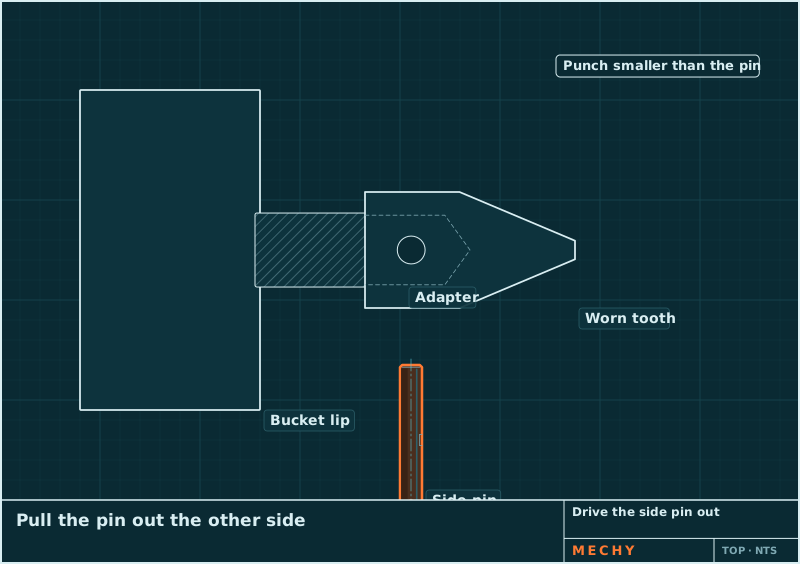
Step 2 of 6
Drive the side pin out
Put a pin punch on the end of the pin and drive it straight through with a hand sledge. Pull it out the far side.
How it works
Snap. Say. Follow.
- 1
Snap
A photo of the machine, the part or the display. Two or three angles help.
- 2
Say
Hold to talk: "Change the teeth on this bucket" or "This screw is stripped". Or type it.
- 3
Follow
Numbered steps with a moving drawing each, read aloud when your hands are busy.
A real guide
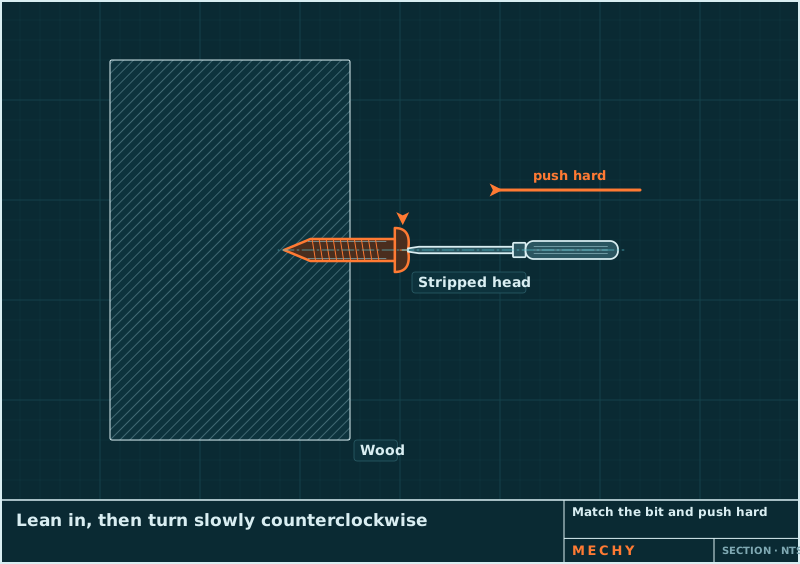
How to Remove a Stripped Screw
Try these in order and stop at the first one that works: a bit that fills the recess, a rubber band, a tapped-in bit, locking pliers on the head, and finally a screw extractor. Each step costs a little more damage than the one before.
- Use the right bit and push hard
- Put a rubber band in the recess
- Tap the bit in for grip
- Grip the head with locking pliers
- Use a screw extractor
- Fit a new screw
In every guide
Everything for the job, in the order you need it
Safety first
Lockout, blocking, power off, hot oil: before step 1, with a clear list of when to stop and call a pro.
Tools you have, tools you need
Mechy ticks the tools it can see in your photos, so you only fetch what's missing. With sizes: 19 mm, #2 Phillips.
Parts to buy by
Specs you can order with: "M8 × 1.25 × 25 mm, grade 8.8". Anything read from a photo is flagged to check.
A drawing that moves
Each step is a CAD-style drawing: the bolt turns out, the pin slides, the arrow shows which way.
Read aloud
Every step can be read out, and you can hold to talk instead of typing.
Specs flagged
Torque, pressure and capacities come marked "check your manual", never as gospel.
Two kinds of work, one app
Heavy equipment
Skid steers, excavators, loaders and haul trucks. Hydraulics, tracks, pins and teeth, filters, and fault codes in plain words.
Around the house
Stripped screws, loose hinges, leaks, switches and fixtures. With the shopping list, and a clear line on when to call a pro.
Why not just search for it?
Search, videos and chatbots all help. Here is where each one fits.
| Compare | Mechy | Videos and forums | General chatbot | Dealer or pro |
|---|---|---|---|---|
| Starts from | Your photo of your machine | A video that looks close | What you type | A visit |
| Steps | Numbered, with a moving drawing each | Scrub through the video | Paragraphs of text | They do the job |
| Tools and parts | Listed with sizes | If the video says | If you ask | On the invoice |
| Safety | First, before step 1 | Varies | Varies | Their job |
| Best for | Jobs you can do with the right steps | Seeing someone do it | Explaining how things work | Warranty, complex and risky jobs |
Free tools
Not sure what you're holding?
Pricing
Start free. Pay when it earns its keep.
No weekly plans, no trial that turns into a charge. Cancel on the web in two clicks.
Questions
Is Mechy free?
Your first guide is free and needs no account. A free account gets 3 guides a month. Pro is $79 a year ($6.58 a month) or $9.99 monthly, for up to 100 guides a month.
What can Mechy help with?
Heavy equipment (skid steers, excavators, loaders, haul trucks: hydraulics, tracks, pins, teeth, filters, fault codes) and the jobs around the house (screws, plumbing, drywall, hinges, fixtures). If a job needs a specialist, the guide says so.
Is it safe to follow?
Every guide starts with the safety steps for the job (lockout, blocking, power off, hot oil) and lists when to stop and call a pro or the dealer. Torque values and other specs are flagged to check against your manual. Mechy is a guide, not a replacement for the maker's manual or your training.
What happens to my photos?
Your photos and voice note are used to make your guide. Guides are private unless you share one. You can delete a guide, or your whole account, from the app. Read the privacy policy for what is kept and for how long.
Does it work on my phone?
The web app works in the browser on any phone or computer today: open mechy.si/app and allow the camera. The iPhone and Android apps are on the way.
Can it read fault codes?
Yes. Snap the display and the machine, and Mechy reads the code, explains it in plain words and makes the steps to check and fix it. Browse the fault code lists too.
On your phone, or right here in the browser
The web app works on any phone today: open it, allow the camera, go. The iPhone and Android apps are on the way.