
AI handyman
A handyman in your pocket, with drawings
Point your phone at the stripped screw, the running toilet or the loose hinge, and say what you want to do. Mechy makes the steps, lists what you need, and tells you when it's a job for a pro.
First guide free. No sign-up, no card.
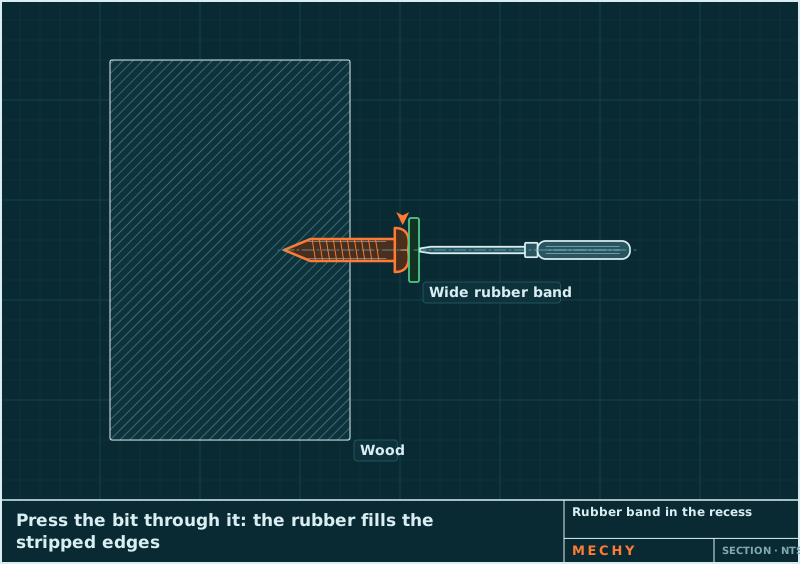
Step 2 of 6
Put a rubber band in the recess
Lay a wide rubber band flat over the head, press the bit through it into the recess, and turn slowly with firm pressure. The rubber fills the worn edges.
How it works
Snap. Say. Follow.
- 1
Snap
A photo of the machine, the part or the display. Two or three angles help.
- 2
Say
Hold to talk: "Change the teeth on this bucket" or "This screw is stripped". Or type it.
- 3
Follow
Numbered steps with a moving drawing each, read aloud when your hands are busy.
A real guide
How to Remove a Stripped Screw
Try these in order and stop at the first one that works: a bit that fills the recess, a rubber band, a tapped-in bit, locking pliers on the head, and finally a screw extractor. Each step costs a little more damage than the one before.
- Use the right bit and push hard
- Put a rubber band in the recess
- Tap the bit in for grip
- Grip the head with locking pliers
- Use a screw extractor
- Fit a new screw
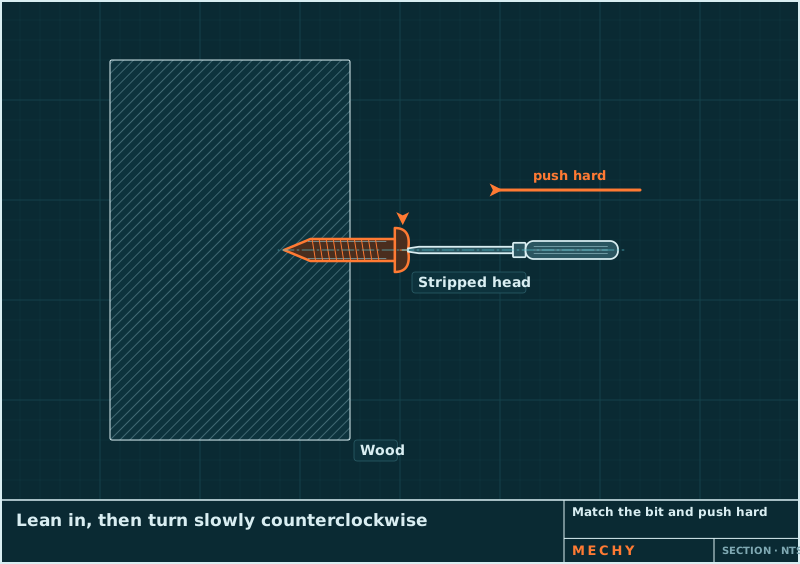
In every guide
Everything for the job, in the order you need it
Safety first
Lockout, blocking, power off, hot oil: before step 1, with a clear list of when to stop and call a pro.
Tools you have, tools you need
Mechy ticks the tools it can see in your photos, so you only fetch what's missing. With sizes: 19 mm, #2 Phillips.
Parts to buy by
Specs you can order with: "M8 × 1.25 × 25 mm, grade 8.8". Anything read from a photo is flagged to check.
A drawing that moves
Each step is a CAD-style drawing: the bolt turns out, the pin slides, the arrow shows which way.
Read aloud
Every step can be read out, and you can hold to talk instead of typing.
Specs flagged
Torque, pressure and capacities come marked "check your manual", never as gospel.
Mechy, a video or a handyman?
Pick by the job. Mechy is for the ones you can do yourself.
| Compare | Mechy | Videos | Handyman call-out |
|---|---|---|---|
| Matches your job | Made from your photo | Find one that looks close | Yes |
| Steps | Numbered, with a moving drawing each | Scrub back and forth | They do it |
| Shopping list | Tools and parts with sizes | Pause and write it down | Included in the bill |
| When not to DIY | Says so up front | Rarely | They decide |
| Cost | First guide free | Free | A visit plus labor |
Free tools
Not sure what you're holding?
Pricing
Start free. Pay when it earns its keep.
No weekly plans, no trial that turns into a charge. Cancel on the web in two clicks.
Questions
What jobs can it help with?
The everyday ones: stripped screws, loose hinges, drywall holes, running toilets, leaky faucets, light switches, shower heads, TV mounts, mower blades. It says when a job needs a licensed pro, such as gas lines or work inside an electrical panel.
Is Mechy free?
Your first guide is free and needs no account. A free account gets 3 guides a month. Pro is $79 a year ($6.58 a month) or $9.99 monthly, for up to 100 guides a month.
Is it safe to follow?
Every guide starts with the safety steps for the job (lockout, blocking, power off, hot oil) and lists when to stop and call a pro or the dealer. Torque values and other specs are flagged to check against your manual. Mechy is a guide, not a replacement for the maker's manual or your training.
Can it tell me what screw or part I need?
Yes. Snap it and Mechy gives the likely size and type, and how to check it before you buy. Try the free screw size tool or part finder.
Does it work on my phone?
The web app works in the browser on any phone or computer today: open mechy.si/app and allow the camera. The iPhone and Android apps are on the way.
On your phone, or right here in the browser
The web app works on any phone today: open it, allow the camera, go. The iPhone and Android apps are on the way.